

Tractor is a modern and robust solution for network rendering, capable of scaling up to the largest render farms.
Tractor distributes tasks to a farm of execution servers. It manages large queues of concurrent jobs from many users, enforcing dependencies and scheduling policies.
Tractor can drive all of the computational tools used in modern VFX and animation pipelines. It is used to run everything from rendering and compositing to simulation, transcoding, archiving, database updates, code builds, online asset delivery and notifications. Tractor can launch almost any executable available on your Linux, Windows, and Mac OS X systems.
You can download my scripts from Nukepedia and follow the Read Me file to install the plug-in in Nuke (special thanks to Marco Curado and the Trixter comp team):
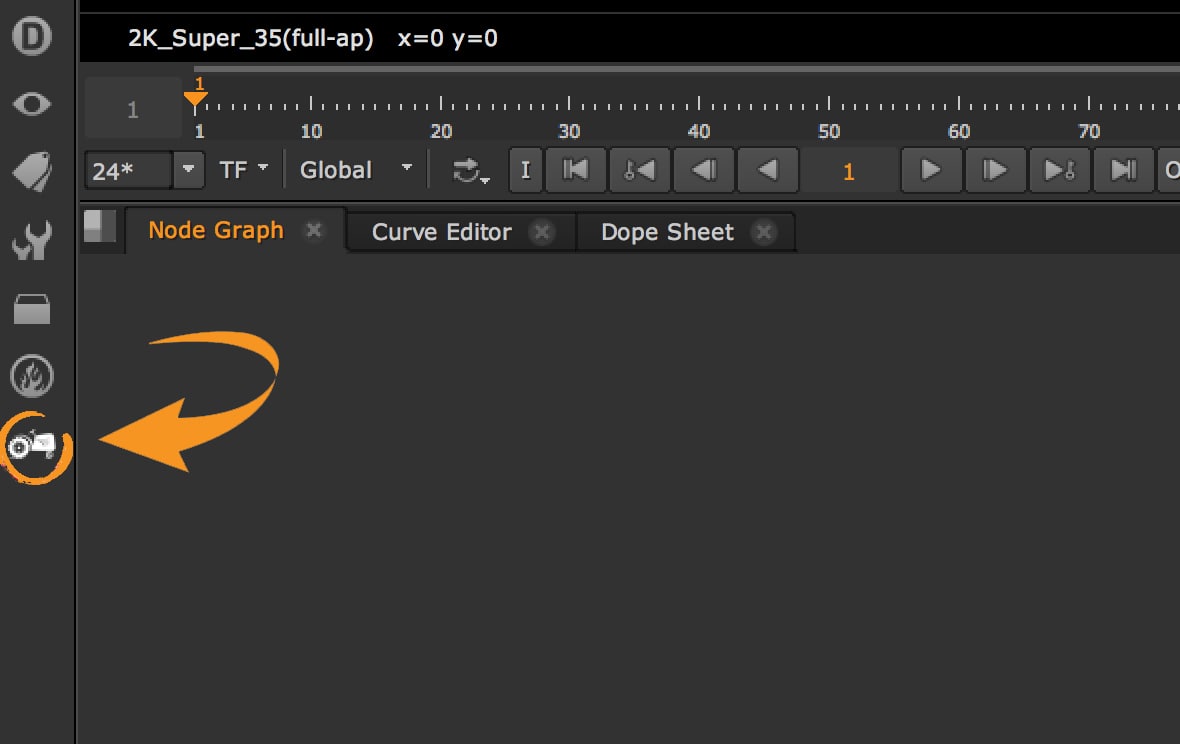
What is Tractor
Tractor is Pixar's render farm manager, made for RenderMan but able to run any command: Nuke renders, simulations, transcodes, copies. You send it a job, a list of tasks with their dependencies, and Tractor spreads them over the machines of the farm, following priorities, limits and the rules of the studio. Many VFX and animation studios use it, especially where RenderMan is the renderer.
- tractor-engine: the central server. It keeps the queue of jobs and decides which task runs where.
- tractor-blade: the program running on every render node. It asks the engine for work and runs the commands.
- Dashboard: the web page (and app) where artists and wranglers follow their jobs, see logs, retry, pause, change priority.
- tractor-spool and the Job Author Python API: how you send jobs, from the command line or from Python.
- Query Python API: how you read the state of jobs and tasks from a script. My tool below uses it inside Nuke.
- NIMBY ("not in my back yard"): lets an artist keep his or her workstation out of the farm while working.
Send a Nuke render to Tractor
A Nuke render on a farm is just a command line. This one renders only the node Write1, frames 1001 to 1010, without the interface (I tested it with Nuke 17):
nuke -x -X Write1 -F 1001-1010 /shots/sh010/comp/sh010_comp_v002.nkWith the Job Author API you wrap that command in a job and spool it to the engine. This follows the example of the Pixar documentation: change the path of Nuke, the script and the service name used on your farm. The engine is read from the TRACTOR_ENGINE environment variable, or set it with author.setEngineClientParam().
import tractor.api.author as author

nuke_exe = '/opt/Nuke17.0v1/Nuke17.0'
script = '/shots/sh010/comp/sh010_comp_v002.nk'

job = author.Job(title='sh010 comp v002', priority=100, service='NukeRender')
for first in range(1001, 1101, 10):
    last = first + 9
    job.newTask(title='frames %d-%d' % (first, last),
                argv=[nuke_exe, '-x', '-X', 'Write1', '-F', '%d-%d' % (first, last), script])
# author.setEngineClientParam(hostname='tractor-engine', port=80)
jid = job.spool()
print('Spooled job', jid)
One task every 10 frames is a good start: tasks that are too short waste time loading the script, tasks that are too long block the queue and lose more work when a machine crashes.
Tractor and the other render managers
You will meet these too, and the ideas are the same everywhere: jobs, tasks, priorities, pools of machines, a web page to follow everything.
- Deadline (AWS Thinkbox): very common in VFX studios of every size, with ready-made submitters for Nuke, Houdini, Maya.
- OpenCue: open source, born at Sony Pictures Imageworks, now part of the Academy Software Foundation.
- Royal Render: a commercial manager used by many studios in Europe.
- Flamenco: the free render manager of Blender.
Useful Links
- Pixar: Tractor
- Tractor documentation
- Tractor: Job Author Python API
- Tractor: Query Python API
- Foundry: Nuke command line operations
- AWS Thinkbox Deadline
- OpenCue documentation
- Royal Render
- Flamenco
- Nuke Python Tutorial and Cheat Sheet
Overview
- READ ATTRIBUTES FROM 'TRACTOR'
Let's start with this Python code.
The easiest way is to open the Script Editor in Nuke and use this simple code.
With this code, written by Marco Curado, you can contact Tractor directly from Nuke with the Script Editor.
import sys

import tractor
from tractor.api import query
from tractor import api
import tractor.api.query as tq

#get only jobs from project TOYSTOY that are already done, with owner=andrea.
done = tq.jobs("projects={TOYSTORY} and done and owner={andrea}", columns=["jid", "title"], sortby=["-priority"],
               limit=60)

#get me all the active jobs
active = tq.jobs("active", columns=["jid", "title"], sortby=["-priority"], limit=20)

#get me all the ready jobs
ready = tq.jobs("ready", columns=["jid", "title"], sortby=["-priority"], limit=40)

#get me all the jobs with errors
error = tq.jobs("error", columns=["jid", "title"], sortby=["-priority"], limit=10)

#print all the jobs done
for elem in done:
	print(elem)
In the variable columns you can select the attribute you want to get.
This is a list of attributes you can return from Tractor.
"""Example of job query return from tractor DB:
{
    u'comment': u' Rendering: Write1.images',
    u'maxslots': 0,
    u'numblocked': 0,
    u'pil': 1701267110,
    u'spoolcwd': u'/tmp',
    u'assignments': u'',
    u'numerror': 0,
    u'elapsedsecs': 21713.669921875,
    u'owner': u'andrea',
    u'spoolhost': u'pc001',
    u'spooladdr': u'10.11.100.110',
    u'jid': 1701267110,
    u'service': u'',
    u'title': u'ToyStory_comp_v002',
    u'numactive': 0,
    u'editpolicy': u'',
    u'spooltime': u'2018-07-22 13:38:05+02',
    u'projects': [u'TOYSTORY'],
    u'crews': [],
    u'maxcid': 82,
    u'metadata': u'',
    u'numready': 0,
    u'tags': [],
    u'afterjids': [],
    u'lastnoteid': 0,
    u'stoptime': u'2018-07-22 14:17:13.046+02',
    u'envkey': [],
    u'tier': u'',
    u'etalevel': 1,
    u'numtasks': 164,
    u'minslots': 0,
    u'serialsubtasks': False,
    u'numdone': 164,
    u'maxtid': 164,
    u'aftertime': None,
    u'maxactive': 0,
    u'spoolfile': u'/unknown_origin',
    u'esttotalsecs': 21713.669921875,
    u'starttime': u'2018-07-22 13:55:56.563+02',
    u'pausetime': None,
    u'dirmap': None,
    u'deletetime': None,
    u'priority': 37315.0,
}

BY Marco Curado"""
GET MY JOBS FROM TRACTOR
Here we are going to create a menu in Nuke where you can check the status of your renders on Tractor and, if necessary, even modify them (for example, retry a job with errors).
import sys

#here you have to insert the path of your folder, something like: tractor/2/linux_x86-64/lib/python2.7/site-packages/
sys.path.insert(0, 'insert here the path of tractor folder')

import nuke
import nukescripts
import tractor
import getpass
from tractor.api import query
from tractor import api
import tractor.api.query as tq
import time

#get me my username
global username
username = getpass.getuser()

#or insert it manually with: username = "insert here your username"

#list of jobs done in the last hour with the owner equals to my username
my_jobs_done = tq.jobs("done and stoptime > -1h and owner=" + username + "", sortby=["-stoptime"], limit=40)

#list of jobs active without errors
my_jobs_active = tq.jobs("active and not error and owner=" + username + "", columns=["jid", "title", "numdone", "maxtid"], sortby=["-priority"], limit=20)

#list of jobs ready and not active yet
my_jobs_ready = tq.jobs("ready and not active and owner=" + username + "", columns=["jid", "title", "numdone", "maxtid"], sortby=["-priority"], limit=40)

#list of jobs with error
my_jobs_error = tq.jobs("error and owner=" + username + "", columns=["jid", "title", "numdone", "maxtid"], sortby=["-priority"], limit=10)

#A job is in pause if the attribute pause is > 1000-01-01 00:00:00.000000+00
my_jobs_paused = tq.jobs("not done and Job.pausetime > '1000-01-01 00:00:00.000000+00' and owner=" + username + "", columns=["jid", "title", "numdone", "maxtid", "pausetime"], sortby=["-priority"], limit=20)
CREATE A MENU FOR NUKE
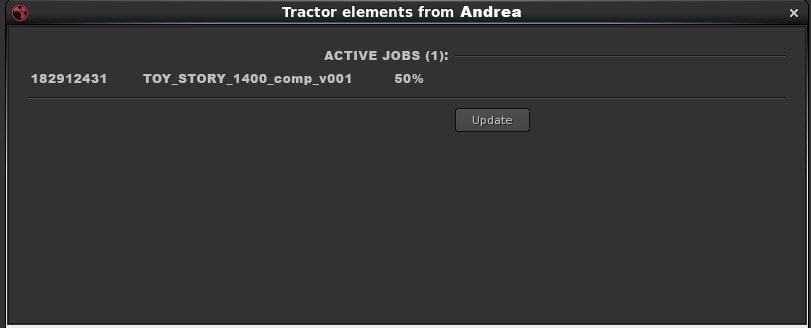
This is the final script. In this case you are going to create a window with all your jobs.
An example of what you will get. In this image you have only 1 job active:
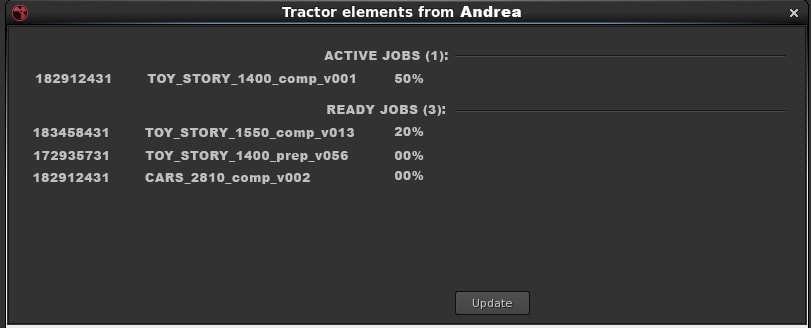
Here you get 1 active job and 3 jobs ready to start:
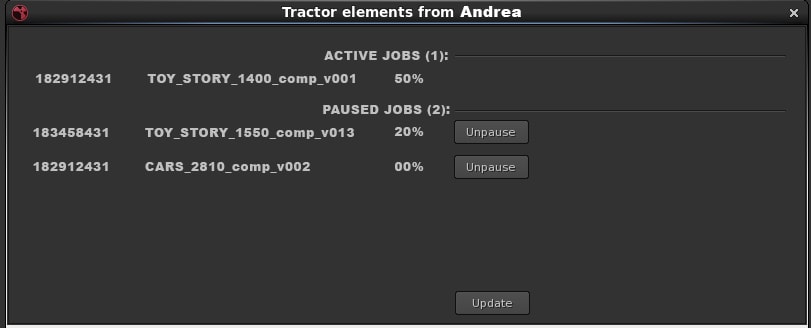
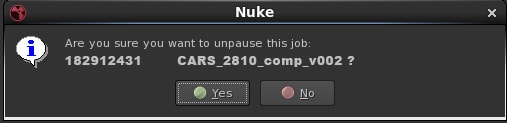
Here is an example with paused jobs. Clicking on the button you can unpause a job:
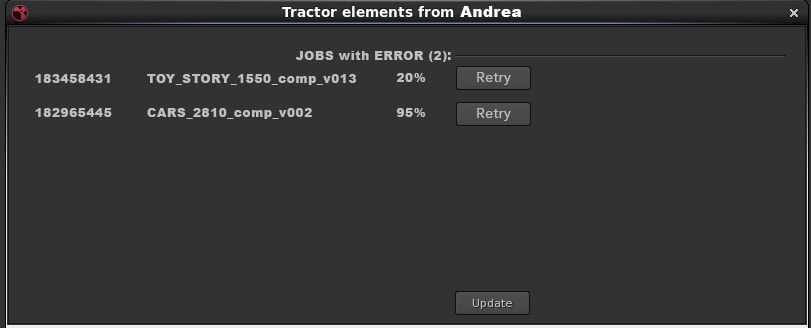
The same goes for jobs with errors. You can retry them easily:
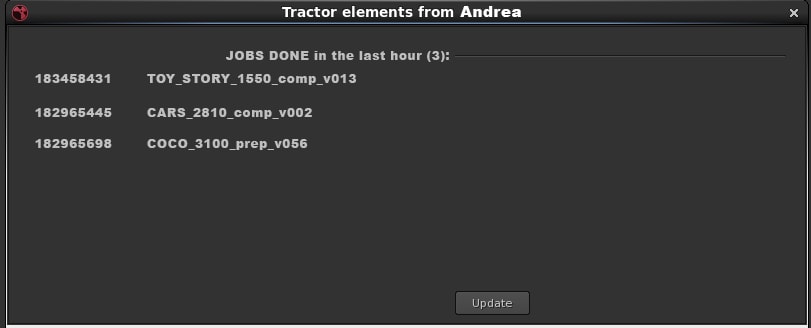
And you will get a list of jobs done in the last hour:
Add this string to the menu.py if you want to create a custom menu. Put the hey_tractor file in your .nuke folder:
#add this script to your file menu.py
import sys
import nuke

#import all the Python files
import hey_tractor

menubar = nuke.menu("Nuke")

toolbar = nuke.toolbar("Nodes")
m = toolbar.addMenu("Custom"")


menubar.addCommand('Custom/Hey Tractor!', "hey_tractor.main()" )
m.addCommand('Hey Tractor!', "hey_tractor.main()" )
import sys
import nuke
import nukescripts
import tractor
import getpass
from tractor.api import query
from tractor import api
import tractor.api.query as tq
import time


def talk_with_tractor():
    global username
    username = getpass.getuser()


#################### INSTRUCTIONS ########################
# Modify the user name and the password of your profile  #
##########################################################

    SIMTRACKER = {"user": "insert_here_your_username",
                  "password": "insert_here_your_password!"}

    tq.setEngineClientParam(user=SIMTRACKER["user"], password=SIMTRACKER["password"])

    global my_jobs_done
    my_jobs_done = tq.jobs("done and stoptime > -1h and owner=" + username + "", sortby=["-stoptime"], limit=40)
    global my_jobs_active
    my_jobs_active = tq.jobs("active and not error and owner=" + username + "", columns=["jid", "title", "numdone", "maxtid"], sortby=["-priority"], limit=20)
    global my_jobs_ready
    my_jobs_ready = tq.jobs("ready and not active and owner=" + username + "", columns=["jid", "title", "numdone", "maxtid"], sortby=["-priority"], limit=40)
    global my_jobs_error
    my_jobs_error = tq.jobs("error and owner=" + username + "", columns=["jid", "title", "numdone", "maxtid"], sortby=["-priority"], limit=10)
    global my_jobs_paused
    my_jobs_paused = tq.jobs("not done and Job.pausetime > '1000-01-01 00:00:00.000000+00' and owner=" + username + "", columns=["jid", "title", "numdone", "maxtid", "pausetime"], sortby=["-priority"], limit=20)


    n_jobs_active = len(my_jobs_active) + len(my_jobs_ready) + len(my_jobs_error)

    array= []


def update():
    global p
    p.finishModalDialog(True)

    p = ShapePanel()

    p.show_modal_dialog()

#-----------------------------------------------------

def retry_job(id, title):
    if nuke.ask('Are you sure you want to retry this job: ' + title + ' ?'):
        tq.retry("jid=" + id + " and error")
        time.sleep(2)
        update()


#-------------------------------------------------------

def unpause_job(id, title):
    if nuke.ask('Are you sure you want to unpause this job: ' + title + ' ?'):
        tq.unpause("jid=" + id + " and Job.pausetime > '1000-01-01 00:00:00.000000+00'")
        time.sleep(2)
        update()

#----------------------------------------
def get_elementPercentage(elem):
        if elem['numdone'] > 0:
            percentage = int(elem['numdone']/float(elem['maxtid'])*100)
        else:
            percentage = 0
        return str(elem['jid']) + '    ' + elem['title'] + '    ' + str(percentage) + "%"

#-------------------------------------------

def get_element(elem):
        return str(elem['jid']) + '    ' + elem['title']

#-------------------------------------------

def get_id(elem):
        return elem['jid']
#------------------------------------------

def get_title(elem):
        return elem['title']

#--------------------------------------------


class ShapePanel(nukescripts.PythonPanel):
    def __init__(self):
        talk_with_tractor()
        #create window
        nukescripts.PythonPanel.__init__(self, 'Tractor elements from ' + username )
        self.setMinimumSize(800, 300)


        def add_knob():
            #add KNOBS

            #ACTIVE JOBS
            if(len(my_jobs_active)>0):
                self.addKnob(nuke.Text_Knob("ACTIVE JOBS (" + str(len(my_jobs_active)) + "): "))
                for elem in my_jobs_active:
                    knob = nuke.Text_Knob(str(get_id(elem)), get_elementPercentage(elem))
                    knob.setValue(" ")
                    knob.clearFlag(nuke.ENDLINE)
                    self.addKnob(knob)


            #READY JOBS
            if(len(my_jobs_ready)>0):
                self.addKnob(nuke.Text_Knob("READY JOBS (" + str(len(my_jobs_ready)) + "): "))
                for elem in my_jobs_ready:
                    knob = nuke.Text_Knob(str(get_id(elem)), get_elementPercentage(elem))
                    knob.setValue(" ")
                    knob.clearFlag(nuke.ENDLINE)
                    self.addKnob(knob)

            #PAUSED JOBS
            #get_paused_job(my_jobs_paused)
            if(len(my_jobs_paused)>0):
                self.addKnob(nuke.Text_Knob("PAUSED JOBS (" + str(len(my_jobs_paused)) + "): "))
                for elem in my_jobs_paused:
                    knob = nuke.Text_Knob(str(get_id(elem)), get_elementPercentage(elem))
                    knob.setValue(" ")
                    knob.clearFlag(nuke.ENDLINE)
                    self.addKnob(knob)

                    self.button = nuke.PyScript_Knob("unpause_" + str(get_id(elem)), "Unpause", "hey_tractor.unpause_job('" + str(get_id(elem)) + "','" + str(get_title(elem)) + "')")
                    self.button.setTooltip(str(get_id(elem)))
                    self.addKnob(self.button)


            #ERROR JOBS
            if(len(my_jobs_error)>0):
                self.addKnob(nuke.Text_Knob("JOBS with ERROR (" + str(len(my_jobs_error)) + "): "))
                for elem in my_jobs_error:
                    knob = nuke.Text_Knob(str(get_id(elem)), get_elementPercentage(elem))
                    knob.setValue(" ")
                    knob.clearFlag(nuke.ENDLINE)
                    self.addKnob(knob)

                    self.button = nuke.PyScript_Knob("retry_" + str(get_id(elem)), "Retry", "hey_tractor.retry_job('" + str(get_id(elem)) + "','" + str(get_title(elem)) + "')")
                    self.button.setTooltip(str(get_id(elem)))
                    self.addKnob(self.button)
                    #print self.button.tooltip()


            #JOBS DONE
            if(len(my_jobs_done)>0):
                self.addKnob(nuke.Text_Knob("JOBS DONE in the last hour (" + str(len(my_jobs_done)) + "): "))
                for elem in my_jobs_done:
                    knob = nuke.Text_Knob(get_element(elem))
                    knob.setValue(" ")
                    knob.clearFlag(nuke.ENDLINE)
                    self.addKnob(knob)


            #ALL OK!
            if(len(my_jobs_paused)==0 and len(my_jobs_error)==0 and len(my_jobs_ready)==0 and len(my_jobs_active)==0 and len(my_jobs_done)==0):
                knob = nuke.Text_Knob("all your jobs are DONE!!")
                self.addKnob(knob)


            #divider
            self.divider = nuke.Text_Knob("divider","")
            self.addKnob(self.divider)

            self.button = nuke.PyScript_Knob("update", "Update", "hey_tractor.update()")
            self.button.setFlag(nuke.STARTLINE)
            self.addKnob(self.button)
#------------------------------------------------------------------------
        add_knob()


    def show_modal_dialog(self):
        nukescripts.PythonPanel.showModal(self)


def main():
    global p
    p = ShapePanel()
    talk_with_tractor()
    p.show_modal_dialog()

#main()